
Which Maps App Should You Use in China? The Truth About Google Maps Breaking Down and the “Coordinate Offset”
By PandaTrip Editorial · 4 min read · Verified 2026-09-06
Verified 2026-09-06

Open Google Maps after landing in China and you will most likely run into one of two situations: the map loads slowly or comes up blank; or the map does display, but searches return no results, your location drifts, and navigation cannot plan a route. This is not a problem with your phone — this guide explains the cause and points you to alternatives that actually work.
The Two Problems With Google Maps in China
Problem one: the service is not directly accessible. Google's services are unreachable from the mainland Chinese network, and connections to Maps servers are restricted in the same way. Travelers on international roaming or an overseas-routed eSIM barely notice; those on a local network cannot even load the map tiles.
Problem two: the data is deficient from the start. Even with a working connection, Google Maps' China data has gone unmaintained for years: business listings are sparse and badly out of date (a restaurant rated 4.8 may have closed years ago), transit data is incomplete, and it holds no local navigation license. The reason is that Google withdrew from the mainland Chinese market long ago, leaving it neither a compliant channel for data collection nor any operational investment. Navigating China with it is like hunting for a newly opened mall with a map that is several years old.
“Coordinate Offset”: The Key Background
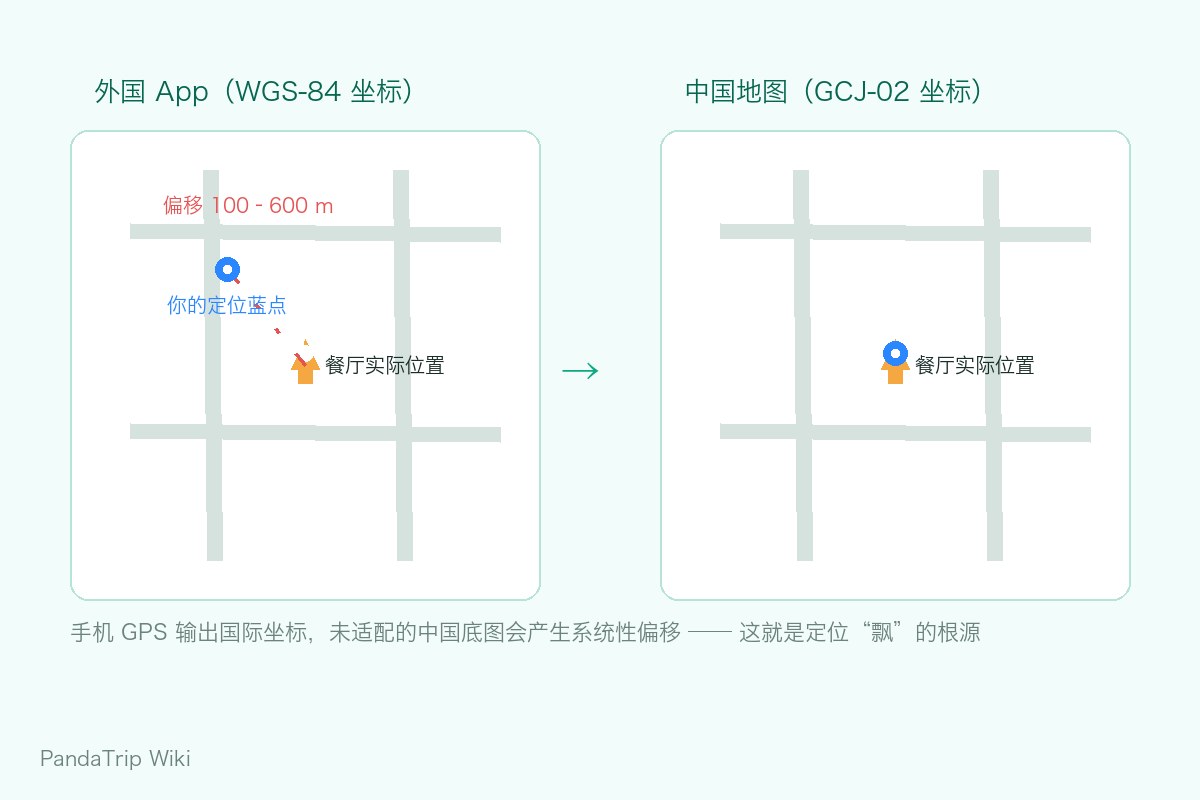
Chinese regulations require publicly released maps to use the GCJ-02 coordinate system (nicknamed “Mars coordinates”) — it adds a nonlinear offset on top of the international-standard WGS-84 coordinates. Every compliant Chinese map (Amap, Tencent; Baidu adds a further layer of its own encryption) uses this system.
The trouble comes from mixing the two: a phone's GPS chip outputs WGS-84 coordinates, and if an app lays them over Chinese map tiles without converting coordinate systems correctly, your location drifts systematically by 100—600 meters — you stand at the hotel entrance while the map shows you on the ring-road expressway. This is the root cause behind the collective “drift” of foreign-developed maps, workout-tracking apps, and photo-geotagging tools in China.
Choose a map already adapted to GCJ-02 (Amap, or Apple Maps with its Chinese data) and your location snaps back to normal.
The Working Options, Ranked
1. The PandaTrip Built-in Map — Tailored for Incoming Tourists
PandaTrip's map plugs directly into local Chinese data sources, with coordinates already converted to GCJ-02, so there is no drift; it offers 25 categories of nearby search (the closest metro entrance, ATM, pharmacy, restroom, embassy) plus walking and driving routes. It also has one capability that fits this exact problem: snap a photo of a Chinese-language address and pin it on the map — a hotel confirmation slip or a screenshot of a location shared in WeChat, photograph it and you can navigate straight there. Free, with an interface in eight languages.
2. AMAP Global (Amap's International Edition)
Launched in January 2025, it is China's first English-language map app aimed at overseas users, available directly from app stores outside China. English place names, route planning, transit lookups, and ride-hailing are all on board, and its data comes from the same source as the Chinese-language Amap — POI density, real-time traffic, and bus arrival times are all accurate at the local level. The drawback is that some deeper features (such as the full account system) still lean toward Chinese phone numbers, which barely affects travel use.
3. Apple Maps — The Least Effort
The zero-effort choice for iPhone users. Its China data is supplied by a local partner: coordinates are accurate, POIs are plentiful, and it supports an English interface and English voice navigation for walking, transit, and driving. Deep search (queue conditions, opening status, and the like) lags behind Amap, but for everyday wayfinding it is more than enough.
4. Baidu Maps
Its data and depth rival Amap's, but English support is weak (some versions have an English mode with mediocre translation quality), making it best suited to users with some Chinese.
Offline Strategies
Network access is not smooth everywhere in China for foreign visitors, so offline map packages are worth preparing in advance: PandaTrip itineraries support offline packages and PDF export (places, routes, and Chinese address cards viewable without a connection); AMAP Global offers downloadable city offline packages; Apple Maps can pre-cache the areas you visit often. Mountain sightseeing and data-saving scenarios both rely on offline fallbacks.
One Practical Habit
When asking for directions in China, pronouncing an English place name is less effective than simply turning your screen around and showing the spot on the map. Keep a hotel business card or a Chinese address card handy too — the navigation app gets you to the building, but the last 50 meters usually depend on a local and your address card.
Frequently asked questions
Why does the blue dot in Google Maps always drift around in China?
By law, public maps in China use the encrypted GCJ-02 coordinate system, while a phone's GPS hardware outputs international WGS-84 coordinates — the two differ by roughly 100—600 meters. When a foreign app applies the wrong conversion, the blue location dot can land a block or two away. Maps already calibrated to the Chinese coordinate system, such as Amap and Apple Maps, do not have this problem.
Does Apple Maps work in China?
Yes, and it works well. Apple Maps' China data is supplied by a local partner, POI density and coordinate accuracy are both solid, and it supports English place names and English voice navigation — the easiest option if you would rather not install a Chinese app.
This guide is licensed under CC BY-NC-ND 4.0 — you may share it as-is with attribution to PandaTrip; commercial use and edits are not permitted.License